
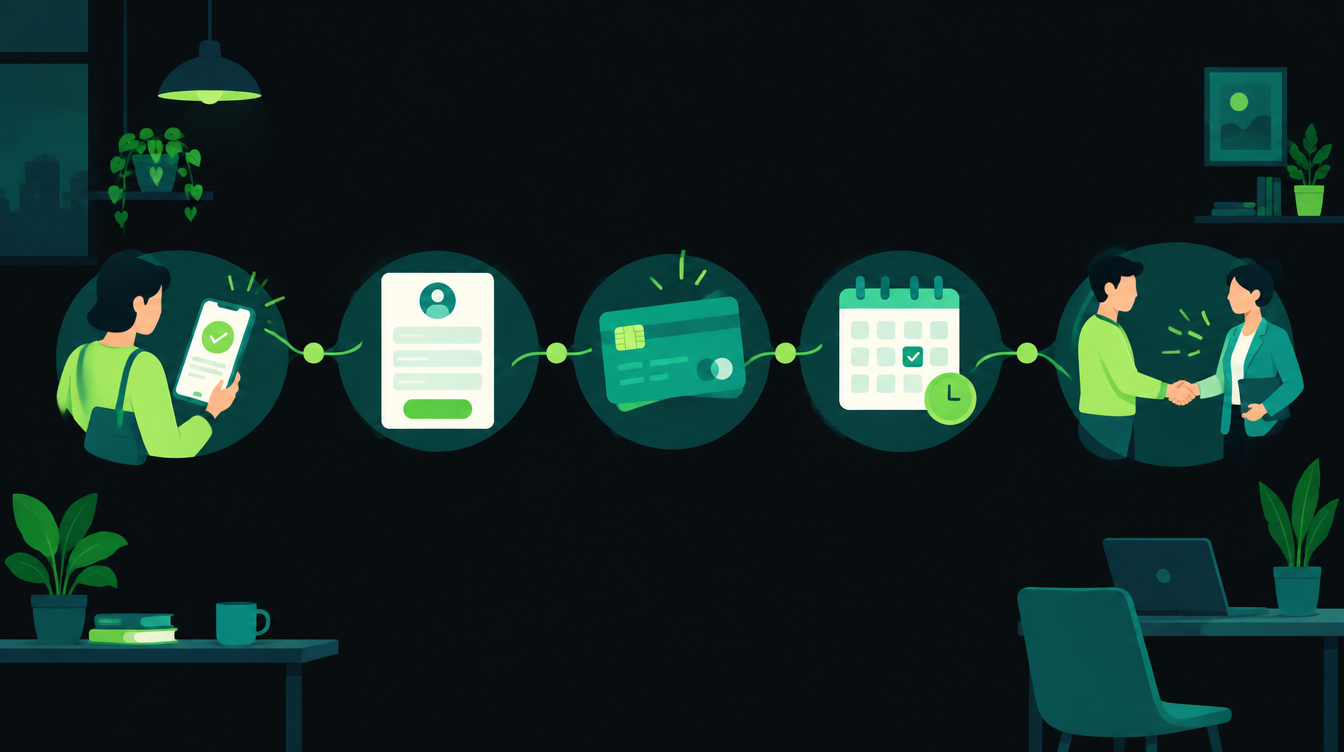
To automate customer onboarding, you pick one trigger (the moment a customer says yes or pays), and from there a set of steps runs on its own: a welcome message, one form for their details, a payment link, a booked kickoff call and check-ins on fixed days. A person still steps in at set points, such as the kickoff call or when a customer goes quiet.
This guide walks through that setup in seven steps for a small business in India. It covers which steps to automate and which to keep human, the WhatsApp and data-privacy rules to follow, the tools that fit a 10 to 200 person company, and a 30-day onboarding checklist you can copy.
Why the first week with a new customer matters
A lot of effort goes into winning a customer. The days right after the sale get far less attention, even though that is when the customer decides whether you were worth it.
In Wyzowl's customer onboarding survey (2020, 216 people), 86% said they would be more likely to stay loyal to a business that invests in onboarding content, and 55% said they had returned a product because they didn't fully understand how to use it. It is a small, older survey, but the direction matches what most owners already see.
Keeping a customer is also cheaper than finding a new one. Harvard Business Review's Amy Gallo wrote in 2014 that acquiring a new customer is anywhere from five to 25 times more expensive than retaining an existing one.
Manual onboarding fails in predictable ways. The welcome email goes out late, someone forgets the GST details, the kickoff call slips a week, and nobody checks in after the first invoice. Automation fixes the forgetting. It does not replace the conversation.
What to automate and what to keep human
Automate the steps that are the same for every customer. Keep a person on the steps where the customer's situation changes the answer.
| Step | Automate? | Why |
|---|---|---|
| Welcome message | Yes | Same for everyone, and speed matters most here |
| Collecting details and documents | Yes | One form beats five back-and-forth messages |
| Payment link and receipt | Yes | Payment tools already send links and receipts |
| Booking the kickoff call | Yes | A booking link removes the scheduling chat |
| The kickoff call itself | No | This is where you learn what the customer needs |
| Check-in messages | Yes, with a stop rule | Reminders run on time; replies go to a person |
| A customer who goes quiet or complains | No | A call from a person works better than another message |
How to automate customer onboarding in 7 steps
The flow below is the whole system. Each step after this one fills in a box.
Step 1: Write down how you onboard today
Before any tool, list every step from "the customer said yes" to "the customer is using what they bought". Include who does it, how long it takes and what usually goes wrong.
Mark the steps that get skipped when the team is busy. Those are your first targets, because automation is best at the steps people forget.
Step 2: Pick one trigger
Every automated onboarding needs a single starting event. Pick the one that is already recorded somewhere:
- A deal marked "won" in your CRM
- A payment received (advance or first invoice)
- A signed quote or a submitted order form
If your leads already flow into one list, as in our guide to automating lead follow-up, the "won" status on that list is the cleanest trigger. One trigger means one place to look when something breaks.
Step 3: Collect details once, with one form
Replace the "please send your GST number, address and contact person" chat with one form. Ask only what you need to deliver: legal name, GSTIN, billing address, the main contact and the documents you need.
Google Forms works for most small teams. Google's help pages note that if you store responses in a spreadsheet, Google Sheets puts the data in a table automatically, which gives your automation a clean row for every customer.
Add a short notice at the top of the form saying what you collect and why, and how a customer can ask you to stop using their data. India's DPDP Rules require this kind of notice. The government's DPDP Rules backgrounder says every business must issue a separate consent notice that is clear and easy to understand, and that people may withdraw consent at any time. The notice rules apply from about May 2027, 18 months after the Rules were notified in November 2025, so building the notice in now saves rework later.
Step 4: Send the welcome on WhatsApp and email
The welcome message should go out within minutes of the trigger. Keep it short: who you are, what happens next, the form link and one named person to contact.
On WhatsApp, three rules matter:
- Opt-in first. The WhatsApp Business Messaging Policy says you may message people only if they gave you their number and agreed to receive messages from you. Add an opt-in line to your quote, order form or the details form.
- Use a template outside the 24-hour window. Meta's pricing docs say a 24-hour customer service window opens when the customer messages you. Outside it, only approved templates can be sent.
- Keep onboarding templates plain. Meta's template categorization guide says utility templates are triggered by a user action, and a template that mixes in promotional content counts as marketing, which costs more.
Send the same welcome by email as well. Some customers, especially in B2B, forward it to the colleague who will actually do the work. If you want this set up on your own WhatsApp number, our WhatsApp automation service covers templates, opt-in and the API setup.
Step 5: Send the payment link or document request
If the customer still owes an advance, the welcome flow should send a payment link the same day. Razorpay's Payment Links docs say you can generate a link from the dashboard or the API and share it by email, SMS or social media, with UPI among the payment methods.
When the payment comes in, the automation marks the row as paid and moves on. If it doesn't, one reminder on Day 1 is enough. A customer who has not paid by Day 3 needs a call, not a fourth message.
Step 6: Let the customer book the kickoff call
Send a booking link instead of asking "when are you free?". Google Calendar's appointment schedules let customers pick a slot from your free time. Google notes that some features need a Workspace or Google One subscription, so check your plan.
The kickoff call stays human. Use it to confirm what the customer expects in the first 30 days, and write that down in the customer's row so the check-ins can refer to it.
Step 7: Schedule check-ins with a stop rule
Check-ins are where most onboarding quietly stops. Schedule them on fixed days, each with one question, and set one rule: the moment a customer replies, the automatic messages stop and a person answers.
The 30-day customer onboarding checklist
Copy this into a sheet, change the days and wording to fit your business, and use it as the specification for whoever builds the automation.
| When | What happens | Channel | Automatic or person |
|---|---|---|---|
| Day 0, within 10 minutes | Welcome: who we are, what happens next, form link, named contact | WhatsApp template + email | Automatic |
| Day 0 | Details form with a short data notice and WhatsApp opt-in line | Google Forms or Zoho Forms | Automatic |
| Day 0 | New row created for the customer with status "Onboarding" | Google Sheets or CRM | Automatic |
| Day 0 | Payment link for the advance, if due | Razorpay or your payment tool | Automatic |
| Day 1 | One payment reminder, only if unpaid | WhatsApp template | Automatic |
| Day 1 | Booking link for the kickoff call | WhatsApp + email | Automatic |
| Day 2 | Form or documents still missing: alert the account owner | Internal WhatsApp or email | Automatic alert, person follows up |
| Day 3 | Kickoff call: confirm goals for the first 30 days, note them in the row | Phone or video | Person |
| Day 7 | One-question check-in: "Is anything blocking you so far?" | WhatsApp template | Automatic, replies go to a person |
| Day 7 | No reply to any message since Day 0: call the customer | Phone | Person |
| Day 30 | Review call: what worked, what didn't, ask for a referral if they are happy | Phone | Owner or account lead |
| Any day | Customer replies or opts out: stop all automatic messages | All | Automatic stop, person replies |
Two settings make this checklist safe to run: a stop rule on every reply or opt-out, and an owner named in every customer row, so alerts always reach a real person.
Which tools to use for onboarding automation
You do not need new software for most of this. Pick the column that matches what your team already uses.
| Job | Google stack | Zoho stack | Connector |
|---|---|---|---|
| Details form | Google Forms | Zoho Forms | Trigger on new response |
| Customer list | Google Sheets | Zoho CRM | Row or record per customer |
| Payment | Razorpay Payment Links | Zoho Books customer portal | Payment received event |
| Kickoff booking | Google Calendar appointment schedule | Zoho Bookings | New booking event |
| Messages | WhatsApp Business API templates plus email | Zapier, Make or n8n | |
Zapier, Make and n8n all connect these pieces. Zapier has a ready Google Forms to WhatsApp Business integration, though its free-form message action only works inside the 24-hour window, so for a first message you need an approved template. For teams that want the workflow on their own server, n8n is the usual choice.
What onboarding automation costs in India
The software is often already paid for. The running cost that changes with volume is WhatsApp. Since 1 October 2026, Meta's pricing docs say service messages are charged at the same rate as utility messages.
Monty Mobile, a messaging provider, reported on 28 September 2026 that India's rates are about ₹0.115 per utility message and ₹0.8631 per marketing message, before GST. Check the current numbers on Meta's own rate card before you budget.
| Item | Per new customer | For 50 new customers a month |
|---|---|---|
| 6 utility WhatsApp messages (welcome, reminder, booking, Day 7 and two status updates) | about ₹0.69 | about ₹35 |
| The same 6 sent as marketing templates by mistake | about ₹5.18 | about ₹259 |
Both figures are before GST and use Monty Mobile's reported rates. The gap is the reason to keep onboarding templates free of offers.
Common onboarding automation mistakes
- No stop rule. A customer replies with a question and still gets the Day 7 "how is it going?" message. Stop on every reply.
- Too many messages. Six touchpoints in 30 days is plenty. More than that reads as spam, and customers can block or report your number.
- Asking for everything on Day 0. Collect what you need to start. Ask for the rest when you need it.
- No named owner. Alerts that go to a shared inbox get ignored. Every customer row needs one person's name.
- Automating the kickoff call. The call is where you learn what "success" means to this customer. Keep it human.
Start with Steps 2 to 4 this week: one trigger, one form and one welcome message. Add payment, booking and check-ins once those run cleanly for ten customers. If you would like a second pair of eyes on your current process, we offer a free 30-minute automation audit through our contact page.
On Wednesday: how to have an AI assistant check supplier or competitor websites for you every week and write the prices into a sheet, using a feature Make added on 30 October.
Want to know what you could automate?
Book a free 30-minute automation audit. We'll look at one process with you and tell you honestly whether automating it is worth it. See how we work or browse our services.
Book a free auditGet posts like this in your inbox once a week. Subscribe to NXT Weekly.
Keep reading
How to Automate Quotations in a Small Business, Step by Step
A seven-step setup for sending accurate quotes within the hour, routing big discounts to the owner and following up until the buyer answers, with a checklist and INR costs.
Tally vs Zoho Books: Which Is Better for Automating a Growing Business?
A side-by-side look at TallyPrime and Zoho Books for Indian businesses that want to automate invoices, approvals and reporting, with 2026 prices in rupees.